Progress Reports
Fall Dates-10/15 - 10/21
What are Progress Reports?
What Are Progress Reports?
Progress Reports give faculty an opportunity to share how students are progressing
in their courses. They help celebrate student success and identify opportunities to
connect students with resources that support their academic progress. You can access
this report from the link in the original email throughout the progress report period
10/15-10/21. This gives you one week to complete your progress report.
Purpose
Progress Reports help WCU proactively identify students who may benefit from additional
support, connect them with appropriate resources, and break down barriers to success.
How the Process Works
- Each semester, instructors receive email requesting feedback on a targeted group of students enrolled in the courses they teach.
- Progress Reports focus on a select population of students rather than all students in every class. The students included in a report are identified in advance based on the purpose of the campaign.
- The email contains a link to the Progress Report Feedback form. Clicking the link takes instructors directly to the Progress Report section in Navigate—there is no need to log in to Navigate first.
- If instructors teach multiple courses or sections, each course will have its own Progress Report. All reports will be included in the email.
Which Students Should You Report On?
- Individual student names will appear on your report.
- Only submit feedback for students you have concerns about or who may benefit from additional support.
- Including comments helps student support staff better understand your concerns and determine appropriate follow-up.
- You do not need to comment on every student listed in your report.
Why are they important?
Faculty and Staff Quotes
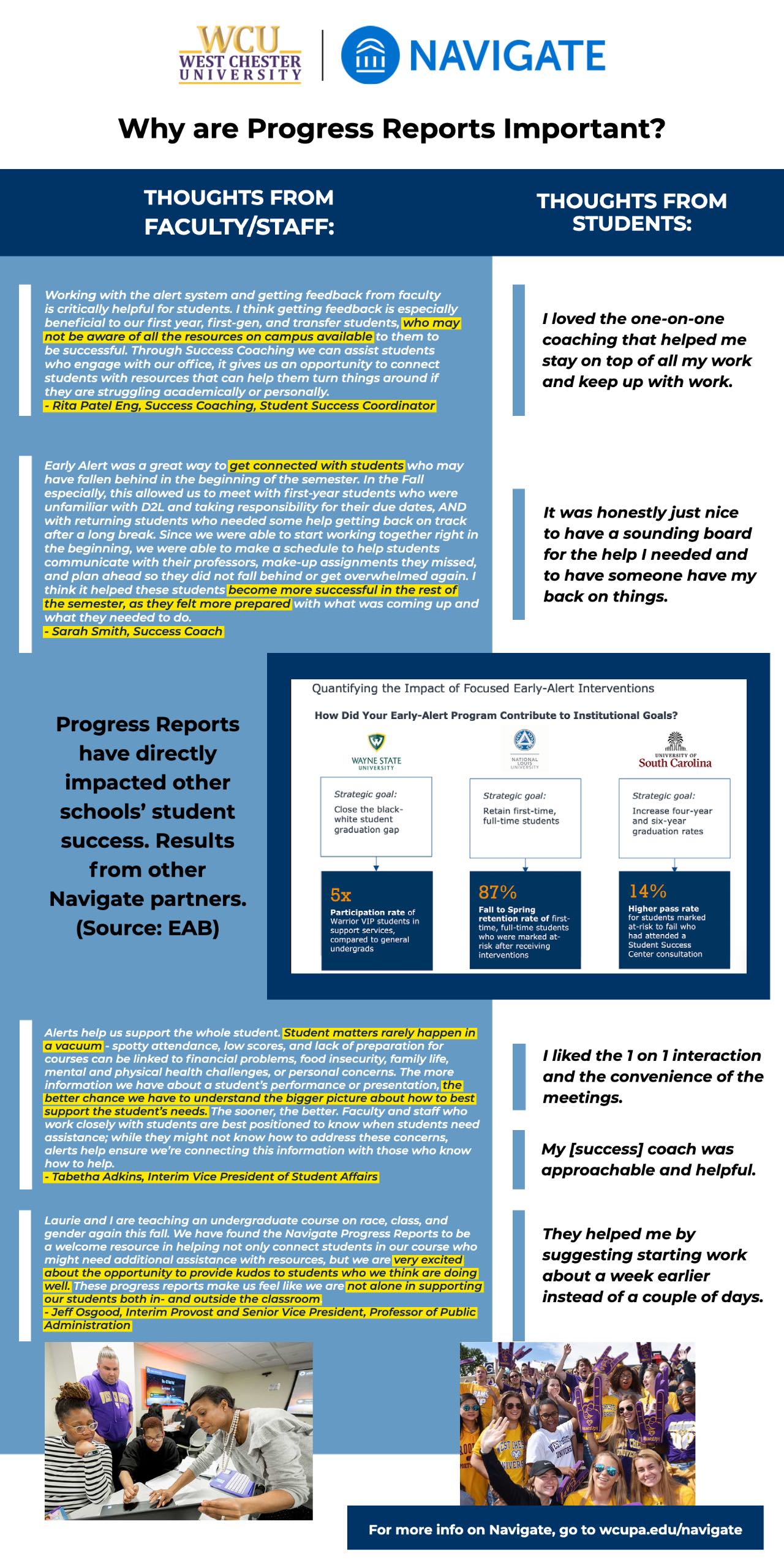
- Working with the alert system and getting feedback from faculty is critically helpful for students. I think getting feedback is especially beneficial to our first year, first-gen, and transfer students, who may not be aware of all the resources on campus available to them to be successful. Through Success Coaching we can assist students who engage with our office, it gives us an opportunity to connect students with resources that can help them turn things around if they are struggling academically or personally. - Rita Patel Eng
- Early Alert was a great way to get connected with students who may have fallen behind in the beginning of the semester. In the Fall especially, this allowed us to meet with first-year students who were unfamiliar with D2L and taking responsibility for their due dates, AND with returning students who needed some help getting back on track after a long break. Since we were able to start working together right in the beginning, we were able to make a schedule to help students communicate with their professors, make-up assignments they missed, and plan ahead so they did not fall behind or get overwhelmed again. I think it helped these students become more successful in the rest of the semester, as they felt more prepared with what was coming up and what they needed to do. - Sarah Smith, Success Coach FA21-SP23
- Alerts help us support the whole student. Student matters rarely happen in a vacuum—spotty attendance, low scores, and lack of preparation for courses can be linked to financial problems, food insecurity, family life, mental and physical health challenges, or personal concerns. The more information we have about a student’s performance or presentation, the better chance we have to understand the bigger picture about how to best support the student’s needs. The sooner, the better. Faculty and staff who work closely with students are best positioned to know when students need assistance; while they might not know how to address these concerns, alerts help ensure we’re connecting this information with those who know how to help. – Dr. Tabetha Adkins
- Laurie and I are teaching an undergraduate course on race, class, and gender again this fall. We have found the Navigate Progress Reports to be a welcome resource in helping not only connect students in our course who might need additional assistance with resources, but we are very excited about the opportunity to provide kudos to students who we think are doing well. These progress reports make us feel like we are not alone in supporting our students both in- and outside the classroom. - Dr. Jeff Osgood
Student Feedback
Student Feedback
What happens when I submit an alert/case/referral/kudos?
- Navigate gives the university visibility into the resources that might best support students in their academic success.
- The alert is routed to the appropriate support staff, who can review the concern and determine the best way to follow up with the student.
- Our goals are to improve student engagement with support from the cases opened in Navigate
- Comments are encouraged on alerts, referrals, and kudos to help support offices support the student.
- Students do not see comments
- WCU has established expectations for staff responding to alerts, including timelines for contacting students and using multiple outreach methods, such as text messages, email, and phone calls.
- When needed, faculty and staff who have an existing relationship with the student may be asked to help connect the student with appropriate services.
Review the table below to see the reason for an alert or referral and who is responsible for responding.
| Feedback Type | Alert/Case | Auto-assigned to | Student category exceptions to auto-assign |
|---|---|---|---|
| Attendance/Academic Concerns |
Alert |
These alerts route to staff/faculty with existing relationships with the student. Examples include COMPASS, Athletics, Academic Success Program (ASP), Student Success Coordinators in ASA. No auto email is sent to student. |
If we get an alert for a student who doesn’t have a direct relationship, then ASA will share information with the student’s faculty advisor. If there is no faculty advisor, it will be shared with the major department chair. |
|
Referral: Study Skills & Time Management |
Alert |
Goes to Success Coaching. Auto-email sent to student
|
NA |
|
Referral: Kudo |
Alert |
The Navigate team, takes the comments faculty provides, and sends students an email. Auto email sent to student |
NA |
|
Referral: Tutoring |
Alert |
The Learning Assistance & Resource Center (LARC) team reaches out to offer tutoring to the student. Auto email sent to student |
NA |
|
Referral: Writing Tutoring Center: |
Case |
Goes to Writing Center. Auto-email sent to student |
NA |
*Indicates that these alerts/cases are sensitive and are not visible on the student profile to users. It is only visible to the teams in those offices.
What success looks like
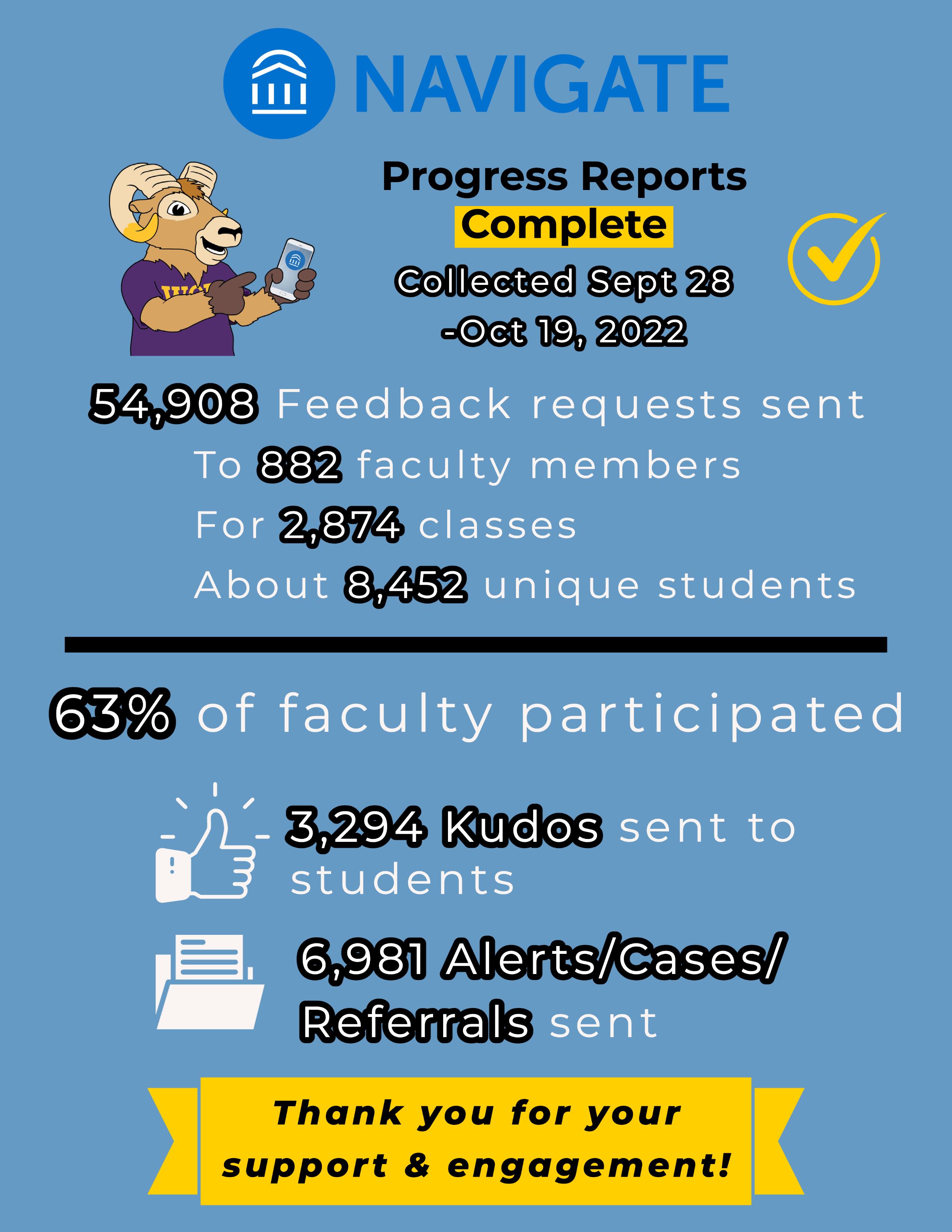
WCU Fall 2022 Pilot
EAB Case Studies