
Grading: Change of Grade on Instructor’s Behalf for Chairs
This guide explains how department chairs can submit a Change of Grade request in RamPortal on behalf of an instructor who is no longer available at the University.
| Contents |
|---|
| Navigation |
| Choose the Term and the Instructor |
| How can you tell if you are submitting on another's behalf |
| Select Course and Student |
| Submit the Change of Grade Request |
| What Happens Next? |
Navigation
- Login to RamPortal using your WCU Single Sign On (SSO).
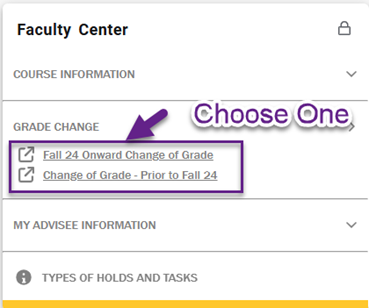
- Locate the Faculty Center card on your homepage.
- Select Grade Change and then choose either Fall 24 onward or Prior to Fall 24.
Choose the Term and the Instructor
- Click on Department Chair Submission for Faculty. If you are unsure of the situation where this would be used, click on the button
titled More Info for an explanation of Chair Submission.

- Choose the term of the course where the grade change is needed from the dropdown list.
- Choose the instructor that taught the course during the term where the grade change is needed.
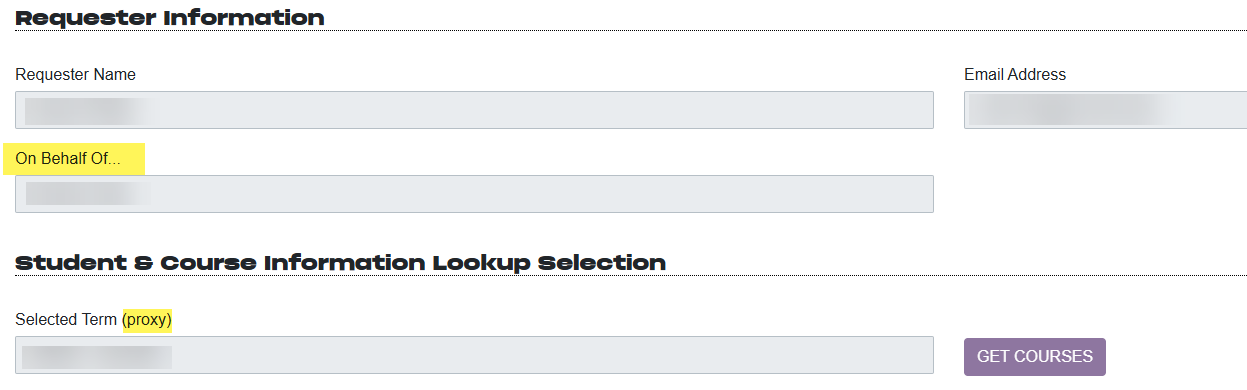
How can you tell if you are submitting on another's behalf
You will see these highlighted indicators that you are submitting a request for another instructor.
Select Course and Student
- After selecting the Term and Instructor, the Selected Term field will automatically populate in the Student and Course Information Lookup Section.
- Click the Get Course button to view available courses for the selected instructor and term.
- From the Select a Course dropdown, choose the course.
- Click the Get Students button. From the list, select the student whose grade needs to be updated.
- Click Get Student Record to load the student's details.
Submit the Change of Grade Request
- Review the information and click the Confirm Student, Course & Section button.
- Choose the New Grade, select a Grade Change Reason from the dropdown menu, and click Submit Grade Change Request.
What happens Next?
What happens next depends on when the grade was originally assigned:
- If it was in the past year, the request goes directly to the Registrar's Office.
- If it was more than a year ago, the request will be routed to the Dean and Provost before the Registrar's Office.
For support, please submit a ticket.