

Re-Enrollment After Cancellation Form
Purpose: This document provides instructions for a student to complete a “Re-Enrollment After Cancellation Form” in RamPortal after the student has been dropped from all courses due to non-engagement or non-payment. (This process was previously submitted as an Exception to Policy.)
| Contents |
|---|
| Navigation |
| Completing the Form |
NAVIGATION
- Log into RamPortal.
- Locate the Student Forms card. (Fig 1)
- Click the “Re-Enrollment after Cancellation Form” link.
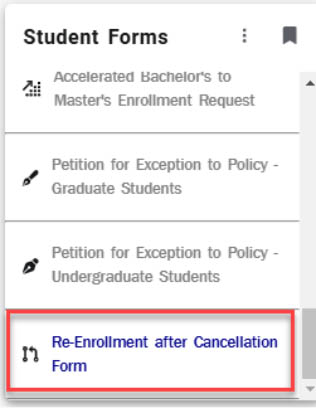
Fig 1
COMPLETING THE FORM
- In the first “Student Information” block, (Fig 2) the student’s RAM Net ID, First
and Last Name, and Email should automatically display. Click the boxes next to the
“Housing Student” or “Financial Aid Recipient” for each that apply.
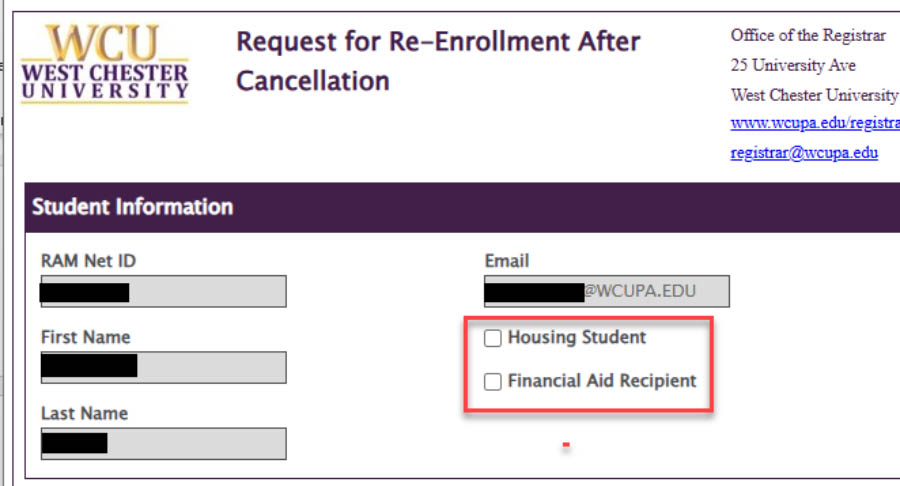
Fig 2 - Next, in the “Request Details” block, (Fig 3) answer the questions accordingly, then provide details on the plan to catch up on missed work/content in the box provided.
- Finally, click “Submit” on the bottom left corner (Fig 3). This form will be submitted
to the Registrar’s office. The Registrar’s Office will then connect with each teaching
faculty for the student to confirm that the student is eligible for re-enrollment.
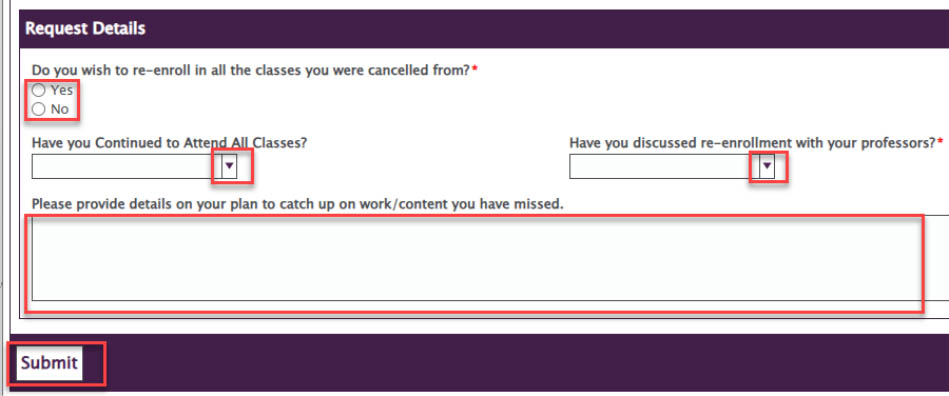
Fig 3
For support, please submit an AES Support Portal ticket.