

Approved Program of Study
Audience: Approved Program of Study Graduate Students
Purpose: This document provides step-by-step instructions for Graduate Students applying for an Approved Program of Study in RamPortal.
| Contents |
|---|
| Accessing The Form |
| Filling Out the Application |
| Uploads and Submission |
ACCESSING THE FORM
- Log into RamPortal.
- Navigate to the Student Links Card and find the link for the Approved Program of Study. (Fig 1)
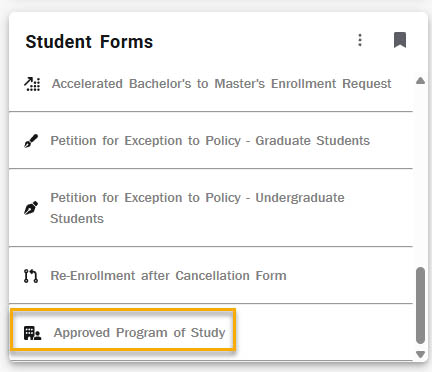
Fig 1 - Your RamNet ID, first name, middle name, and last name should be automatically pre-populated. If not, please close the form and try accessing it again.
FILLING OUT THE APPLICATION
- Select the Certification Area and Certification Pursued from the provided dropdown menus (Fig 2).
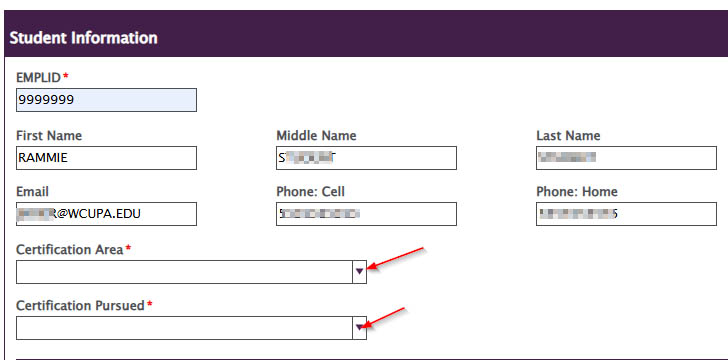
Fig 2
Note: Depending on the certification area selected, additional prompts or extra criteria requirements may appear dynamically on the form.
UPLOADS AND SUBMISSION
- Ethics Module: If your program requires it, the area to upload your ethics module documents will display. Please upload all forms as four separate PDFs.
- Select Attach File (Fig 3)
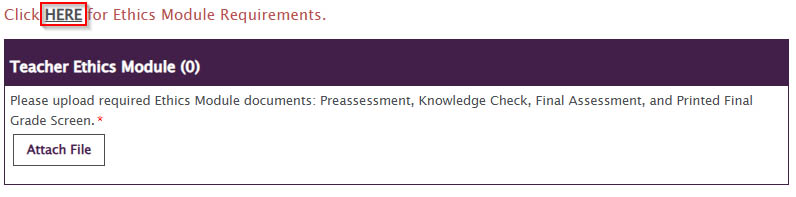
Fig 3 - Browse to the location of the file on your computer (Fig 4).
- Select the file and click OPEN (Fig 4).
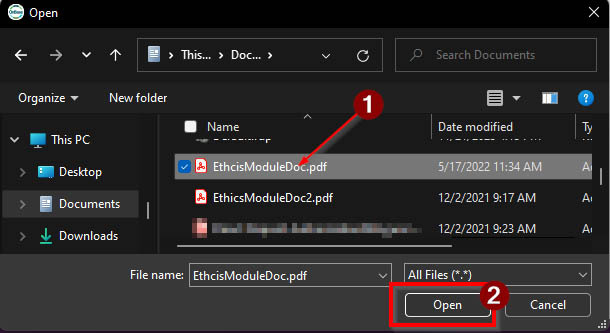
Fig 4 - Once attached, the screen will say “Pending” until the form is submitted (Fig 5).
- You may attach additional transcripts by selecting Attach Documents again (Fig 5).
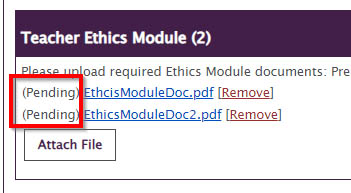
Fig 5 - Attestations: Read and agree to all required candidate attestations.
- Signature: Digitally sign the document and click Submit.
- A notification will be sent to your campus email address once submitted
For support, please submit an AES Support Portal ticket.