
Campus Resources and Supports for Students
WCU remains committed to fostering an inclusive and supportive environment and will continue to provide updates and address concerns with clarity and accuracy. Sometimes we might not know what to do when faced with concerning or unknown situations or the feelings they evoke. This document is designed to provide a single location with the resources and information available to you.
Interacting with Law Enforcement
- Contact WCU’s Public Safety Office (610-436-3311) if you come into contact with non-WCU law enforcement on campus. For those at locations other than WCU’s main campus, please contact 911 and thereafter contact WCU’s Public Safety.
Resources Available to Students
- WCU Immigrants and Allies Association: Student-led organization that offers support and resources for undocumented and immigrant students.
- Pennsylvania Immigration Resource Center (PIRC): Provides free legal services to immigrants at risk of detention or deportation.
- Immigrant Legal Resource Center (ILRC): Provides educational materials, training, and advocacy to protect the rights of immigrants. One of their key tools is the Red Card.
- WCU Counseling Center: Supports for students experiencing stress, anxiety, or trauma.
- Campus Assessment Response and Education (CARE) Team: Provides coordinated support for students facing personal, academic, or other challenges.
- For students seeking a direct point of contact: Porsche Murray, Assistant Director/Coordinator of Equal Opportunity Programs and Strategic Initiatives, in the Office of Equal Opportunity and Compliance can assist.
Campus Safety Protocols
- If students have safety concerns, they should contact Public Safety (or 911 for those who are not on WCU’s main campus).
- Should a report to Public Safety suggest stalking, threats, or violence due to gender, race, ethnicity, national origin, etc., Public Safety officers will submit a report to the Office of Equal Opportunity and Compliance (EOC).
- Public Safety regularly works with local, state and federal agencies.
- Public Safety officers do not conduct citizenship checks.
Contacting Public Safety in an Emergency
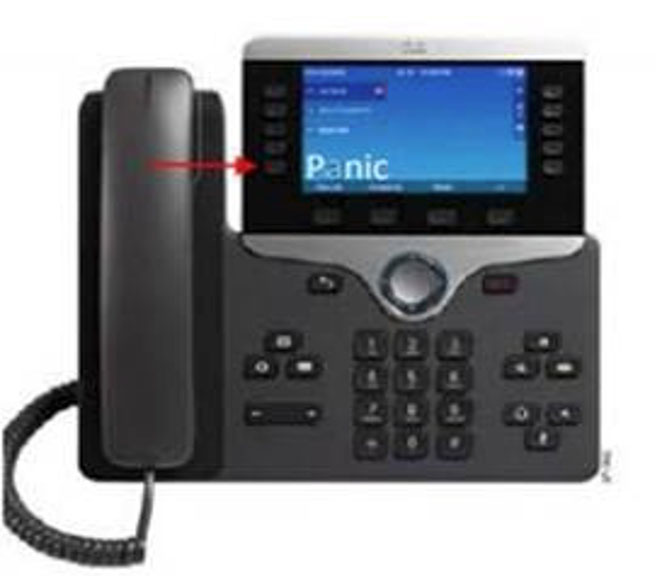
- Panic Button on every desk phone: As of January 18, 2021, every desk phone has a Panic Button key that when pressed will send a silent alert to Public Safety.
- Where is the Panic Button located: You will find the panic button key on the bottom left button of your phone display.
- What happens when I press the Panic Button on my phone?: Pressing the button will alert Public Safety of your location and Caller ID. This is a silent alert from your standpoint so as not to alert anyone else nearby. You will not hear a telephone ring or dial tone, nor will you hear Public Safety answer the call on the other end. It is designed this way for your safety. For questions or further information, please contact Public Safety at DPS-ESSUPPORT@wcupa.edu
- If I press the Panic Button, will Public Safety dispatch an officer to my location?: Yes, pressing the Panic Button will prompt immediate response from Public Safety. Care must be taken not to press the button accidentally. The button is strategically located to reduce the likelihood of an accidental alert.
WCU Safe
- WCU Safe is the official safety app of West Chester University. It is the only app that integrates with WCU's safety and security systems and is our recommended app for individuals in rooms without phones that provide the panic button.
- The Department of Public Safety has worked to develop a unique app that provides students,faculty and staff with added safety on the WCU campus. The app will send you important safety alerts and provide instant access to campus safety resources.
Features of WCU Safe
- Panic Button/Mobile Bluelight: Send your location to WCU Public Safety in real-time in case of a crisis.
- Emergency Contacts: Contact the correct services for the WCU area in case of an emergency or a non-emergency concern.
- Virtual WalkHome: Allow Public Safety to monitor a user’s walk. If a user feels unsafe when walking on campus, they can request a Virtual WalkHome and a dispatcher on the other end will monitor their journey until they reach their destination.
- Public Safety Escort: This walking escort service is provided to students, faculty, and staff from one on-campus location to another.
- Friend Walk: Send your location to a friend through email or SMS on your device. Once the friend accepts the Friend Walk request, the user picks their destination, and their friend tracks their location in real time;they can keep an eye on them to make sure they make it safely to their destination.
- Emergency Plans: Campus emergency documentation that can prepare you for disasters or emergencies. This can be accessed even when users aren’t connected to Wi-Fi or cellular data.
- Support Resources: Access support resources in one convenient app to enjoy a successful experience at WCU.
- Safety Notifications: Receive instant notifications and instructions from WCU Public Safety when on-campus emergencies occur.
Important Contact Information
- Public Safety: 610-436-3311
- President’s Office: 610-436-2471 and president@wcupa.edu
- Academic Contracts and Compliance: 610-436-2817
- Office of Equal Opportunity and Compliance: 610-436-2433 and eoc@wcupa.edu
- WCU Counseling Center: 610-436-2301